
Utilization-aware scheduling allocates GPUs based on real usage, not requests alone. It combines five capabilities: utilization tracking, atomic gang scheduling, full-resource co-scheduling, business-driven priority, and hardware health gates. Together, these capabilities can help AI teams raise GPU utilization without buying more hardware.
A Cluster That Should Have Been Fixed
Picture an infrastructure team midway through a turnaround. Over the past few months, they fixed the obvious problems one at a time. They stopped confusing allocation with utilization. They moved distributed training jobs to atomic gang scheduling, so a job no longer holds seven GPUs hostage waiting on an eighth. They added priority tiers and preemption, so a weekend experiment can no longer block a Monday launch.
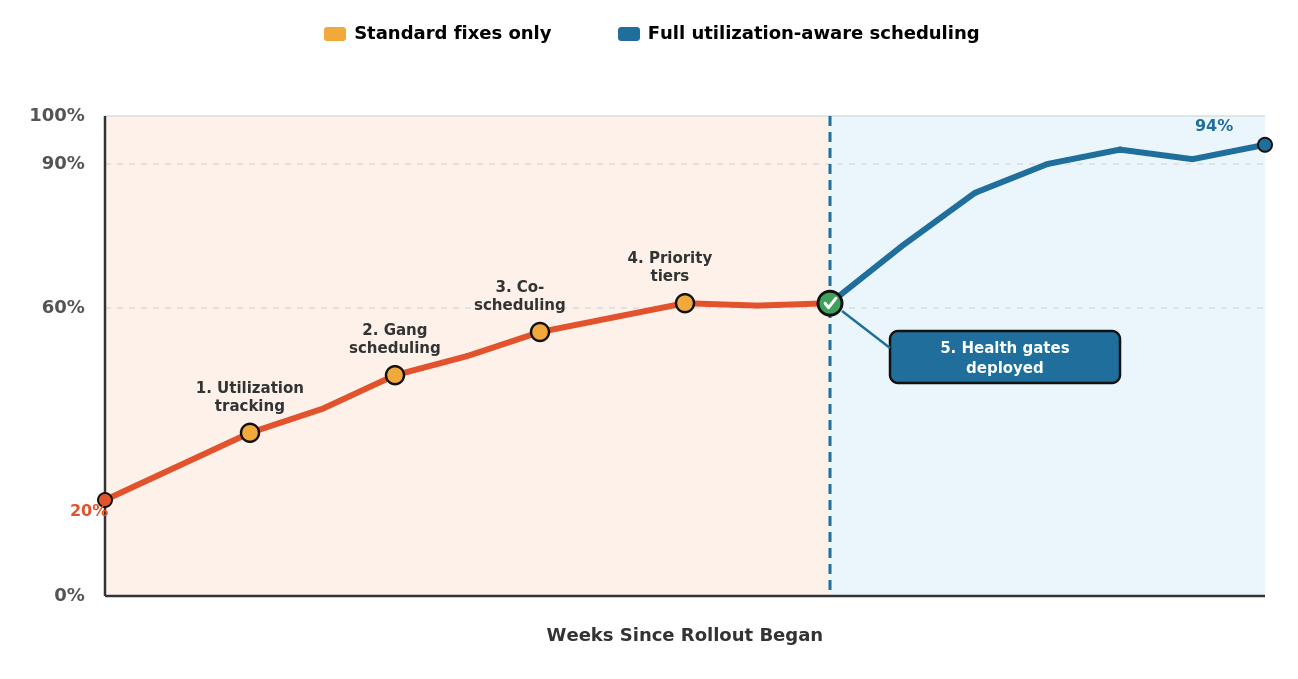
Each fix helped. Dashboards looked better. But utilization still hovered near 60%, and the team could not explain why.
The answer usually is not adding another scheduling rule. Instead, the five capabilities often fail because they do not operate as one system. Utilization-aware scheduling creates that system. It also adds a fifth capability that many roadmaps skip: gating the queue on hardware health.
In Figure 1, four scheduling fixes lifted utilization from 20% to 60%, after which it stalled. The fifth capability pushed it beyond 90%.
Why Do Standard Schedulers Fall Short?
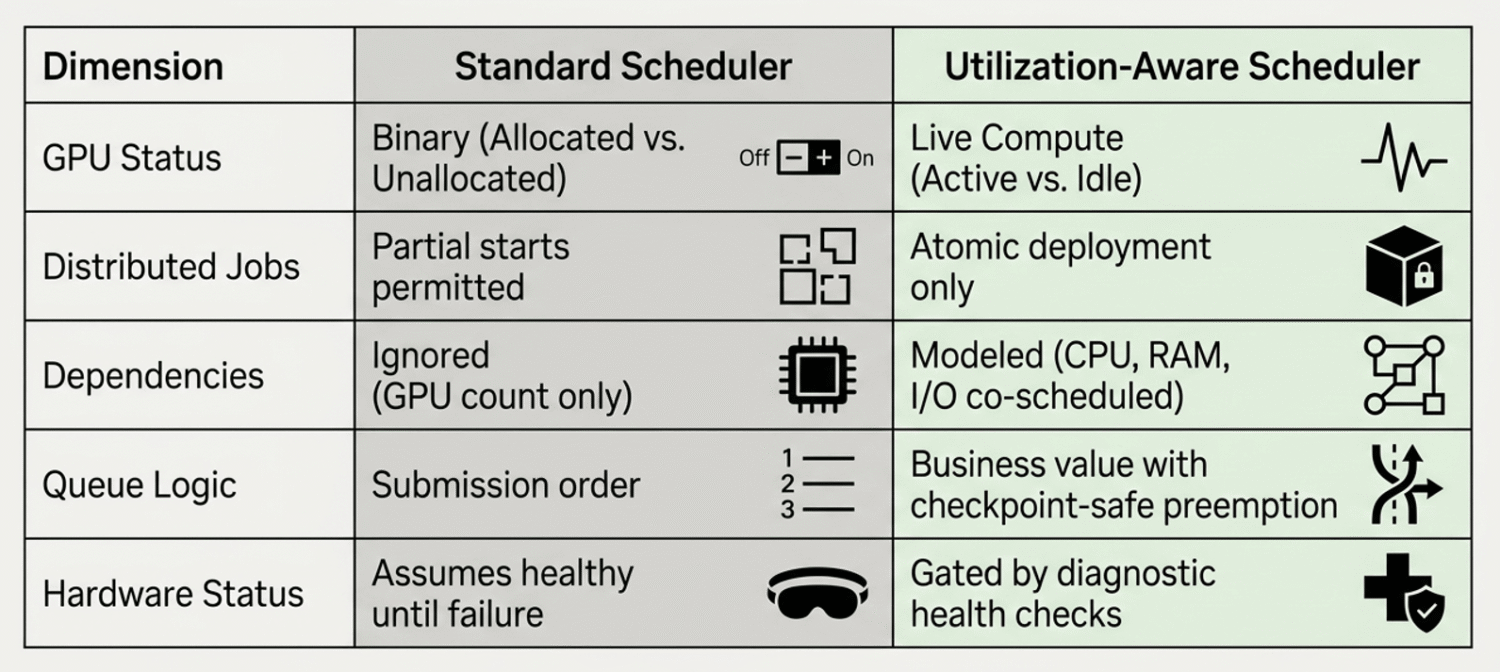
Standard schedulers fall short because they treat GPUs as binary resources: allocated or not. They ignore utilization, memory bandwidth, and compute behavior once a job starts. That gap is why more than 75% of organizations report peak GPU utilization below 70%, according to the ClearML-2024 State of AI Infrastructure at Scale report. A more recent ClearML report found the root cause has barely moved: 44% of enterprises still assign GPU workloads manually or run with no defined utilization strategy at all.
The cost compounds with cluster size. Raising utilization from 60% to 85% on a 100-GPU H100 cluster saves roughly $1.8 million a year. At multi-cluster, enterprise scale, that figure reaches eight figures.
Binary allocation also breaks distributed jobs. If a PyTorch job needs eight GPUs and only seven pods start, a standard scheduler does not treat that as a failure. The job holds seven GPUs while it waits for the eighth. As a result, it burns invested capital without advancing training.
What Five Capabilities Does a Utilization-Aware Scheduler Need?
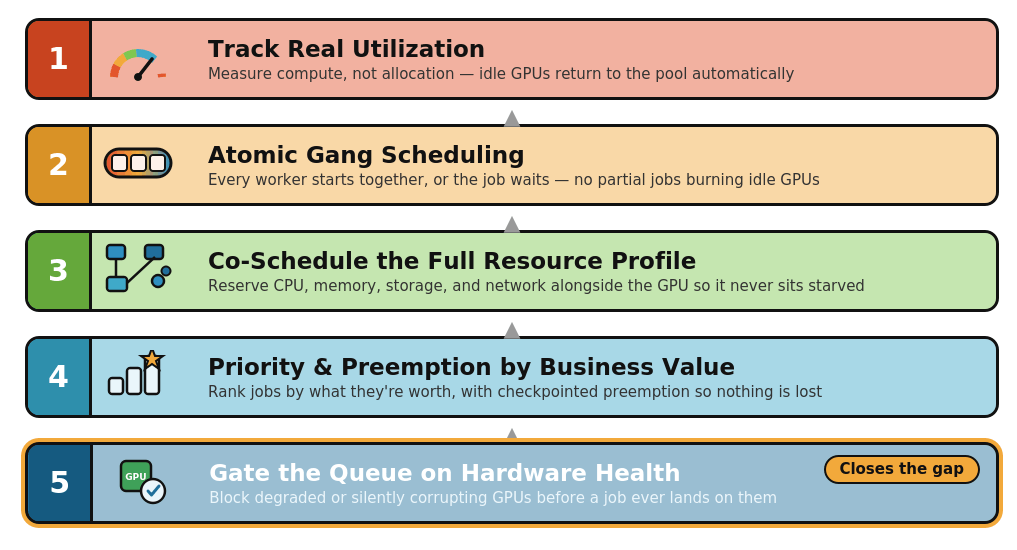
A utilization-aware scheduler needs the five capabilities to work as one pipeline. Each capability closes a gap the others cannot cover. Together, they help the scheduler coordinate resources across the full AI cluster ecosystem.
1. Track Real Utilization, Not Just Allocation
The scheduler should measure how much a GPU is actively computing, not whether it’s assigned. Jobs that request GPUs and then sit idle should return that capacity automatically so the scheduler can redirect it.
Fujitsu’s AI Computing Broker does this with runtime-aware orchestration: it monitors live utilization and backfills idle capacity with smaller jobs while larger jobs wait for space. In practice, this is the same allocation-versus-utilization gap we covered in why high allocation doesn’t mean high utilization. A dashboard showing 100% allocation can still hide GPUs running at a fraction of their compute capacity.
2. Treat Distributed Jobs as a Single Atomic Unit
Distributed training needs every resource at once, not most of them. Gang scheduling makes the entire job group, not the individual resources, the unit to which the scheduler commits a placement decision.
Tools such as Volcano, NVIDIA KAI Scheduler, and Apache YuniKorn enforce this with an all-or-nothing rule: either every rank gets a GPU, or none do, and the job waits in queue instead of burning partial capacity. We covered the failure mode fix in detail in gang scheduling failures. A 32-GPU job stuck at 28 ranks doesn’t run at 87% speed. It runs at 0%, while 28 GPUs sit reserved and idle.
3. Co-Schedule the Full Resource Profile
A GPU is only as fast as the CPU, memory, storage, and network feeding it. Scheduling GPU count alone ignores the resources a training job depends on to keep that GPU fed.
Microsoft Research traced 46.03% of low GPU utilization incidents back to data operations, not the GPU itself. A scheduler that reserves CPU cores, memory bandwidth, and storage I/O alongside the GPU request prevents the scenario we detailed in GPU resource starvation: dashboards showing 100% allocation while GPUs sit at 15% utilization, starved by a bottleneck the scheduler never modeled.
4. Let Priority and Preemption Reflect Business Value
Submission order doesn’t have any business value. A scheduler needs priority tiers that rank jobs by what they’re worth. It also needs preemption that can interrupt a low-value job and hand its GPUs to a high-value one, with checkpointing, so preemption doesn’t destroy hours of training progress.
We go deep on the mechanics, including priority tiers, priority-driven preemption, and checkpoint-safe eviction, in priority blindness. The short version: without this layer, a Friday side experiment can block a Monday product launch, and nothing in the scheduler even notices.
5. Gate the Queue on Hardware Health
A GPU can pass basic monitoring and still deliver less compute than expected, or worse, deliver wrong results without any error at all. Health gates keep degraded hardware out of the queue before a job ever starts on it.
This is the piece most utilization roadmaps skip, because it doesn’t show up until a cluster is already running at scale.
Two failure modes matter:
Detectable failures. NVIDIA’s Xid error codes flag hardware problems in real time. For example, Xid error number 48 signals an uncorrectable double-bit ECC error and usually means the GPU needs replacement. DCGM, NVIDIA’s Data Center GPU Manager, runs tiered diagnostics, from a fast readiness check to a full sweep of interfaces, memory, thermal, and power, that a scheduler can call before admitting a job to a node.
Silent failures. Silent data corruption creates a harder problem. A GPU can compute wrong results without logging an error. Meta reported silent data corruption during Llama 3 training, and Google has reported recurring silent corruption events during Gemini-scale training. These failures do not always trigger a crash. Instead, they can corrupt training until someone notices the loss curve looks wrong.
A health gate closes both gaps. It runs diagnostics before a job enters the queue, keeps monitoring during the run, and pulls a node out of rotation the moment it starts producing errors, silent or otherwise. Without it, the other four capabilities can schedule a job perfectly onto hardware that shouldn’t be running it.
How Does Utilization-Aware Scheduling Compare to Standard Scheduling?
Utilization-aware scheduling addresses the biggest gaps in standard scheduling. It looks beyond allocation, prevents partial-job waste, models the full resource profile, and moves high-value work to the front of the queue. As a result, AI teams can get more business value from the GPUs they already own.
What Results Are Teams Seeing?
Production data backs this up across vendors. Google’s Dynamic Workload Scheduler improves GPU and TPU access for queued AI workloads. NVIDIA reports that advanced scheduling can double utilization in some inference scenarios. CIO documented CNCF member organizations moving from 13% to 37% utilization, with some implementations passing 80%.
None of these gains came from buying more GPUs. They came from making the GPUs already in the cluster do more useful work.
Three Key Takeaways
What is utilization-aware GPU scheduling? It’s a scheduling approach that tracks real GPU usage instead of just allocation. It reclaims idle capacity, enforces business priority, co-schedules the full resource profile, and blocks degraded hardware before it enters the queue. Together, these keep high-value AI jobs running on healthy, well-fed GPUs.
Do all five capabilities need to launch at once? No. Most teams sequence them: utilization tracking and gang scheduling first, since they address the most visible waste, then co-scheduling and priority tiers, then health gates once the cluster is large enough for silent hardware failures to matter. Each layer compounds the ones before it.
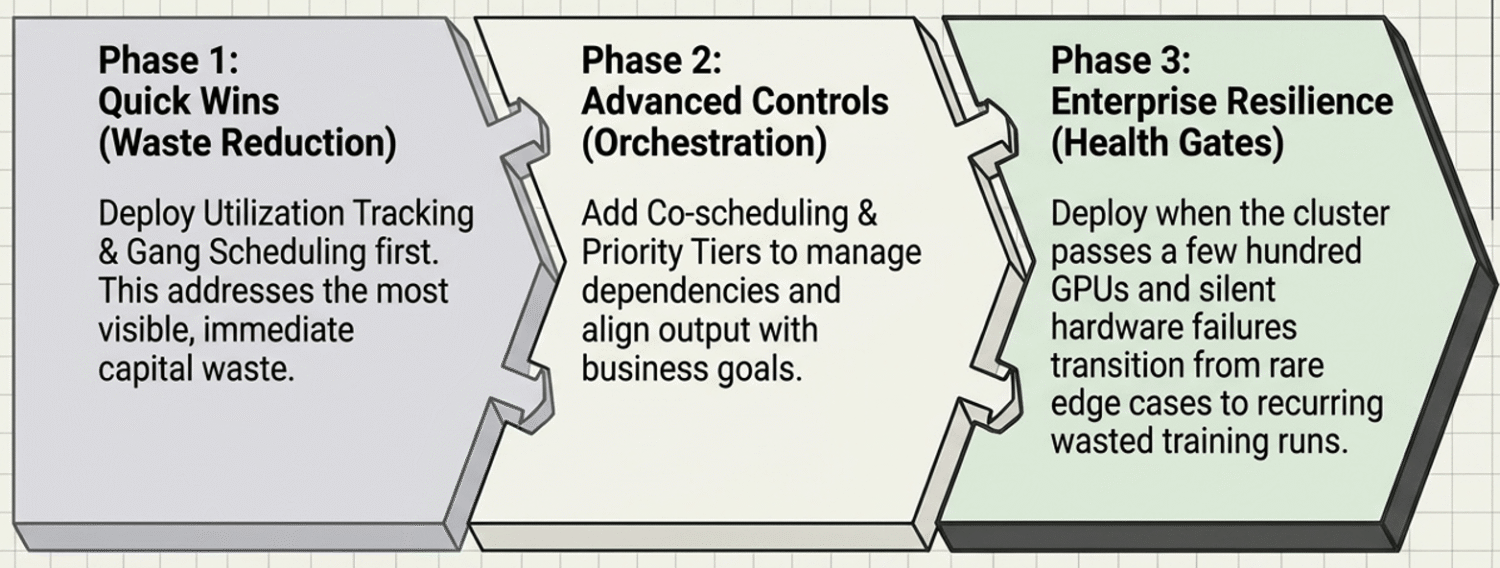
When should a company invest in health gates specifically? When GPUs look busy, but training results become unreliable, or when the cluster is large enough, typically past a few hundred GPUs, that silent hardware failures stop being rare edge cases and start being a recurring line item in wasted training runs.
Next Steps
If your cluster has fixed allocation, gang scheduling, and priority but still stalls, hardware health may be the missing piece. HighFens helps infrastructure teams audit all five capabilities, identify the constraint, and improve utilization without adding GPUs.
If that’s the conversation you need, reach out to us.