
Gang scheduling failures waste GPUs when distributed AI jobs start before all workers are ready. The fix is simple: enforce all-or-nothing scheduling so all required workers start together. As a result, expensive GPUs no longer sit idle while ranks wait for missing peers.
What Is Gang Scheduling?
Gang scheduling is an “all-or-nothing” job scheduling method for distributed AI workloads. It allocates all required GPUs, CPUs, and worker pods simultaneously. For example, a large language model training run cannot advance until every worker checks in. Therefore, a partially placed job does not just run more slowly. It stalls while still holding GPUs.
Compared with standard one-at-a-time placement, gang scheduling may increase queue wait time. However, it ensures that any job that starts can make progress:
| Pros | Cons |
|---|---|
| Prevents partial allocation, so GPUs are not held by workers waiting for peers that never arrive. | Can increase queue wait times for large jobs because resources are held until the full group is available. |
| Keeps throughput predictable. A job that starts is a job that can make progress. | Can fragment resources or starve large jobs on busy clusters if placement is not well managed. |
| Simplifies failure handling, since all-or-nothing is easier to reason about than partial states. | Depends on scheduler support. Not every default scheduler enforces gang semantics out of the box. |
That last limitation is where most gang scheduling failures begin. The scheduler must enforce the all-or-nothing rule. Otherwise, the benefits never appear, and partial jobs continue to waste GPU capacity.
Fortunately, most schedulers offer tuning parameters that let teams balance gang scheduling against other, less complex jobs.

Next, let us look at what that failure looks like in production.
What Causes Gang Scheduling Failures?
Gang scheduling failures happen when general-purpose schedulers place workers one at a time. These schedulers often optimize short-term utilization rather than full placement of worker groups. However, distributed AI training requires all workers to be available at once.
For example, a 32-GPU job may place 28 ranks while 4 still wait. According to Cloud Optimo (2026), those 28 workers can hold GPUs at near-zero utilization while they wait for missing peers.
The problem grows with scale. A Microsoft Research study found that gang constraints, locality needs, and cascading failures increase queue delays. They also reduce GPU use in multi-tenant clusters.
As a result, the cluster looks busy but produces little work. According to Introl (2025), one large AI lab’s GPU clusters sat idle 43% of the time. That happened despite a six-month training backlog. Introl estimated the waste at $127 million a year.
VentureBeat and SDxCentral also report average enterprise GPU utilization of near 5%. Poor scheduling often contributes to that pattern.

How Do You Spot a Gang Scheduling Failure?
Gang scheduling failures usually show up in three patterns: stuck initialization, a mismatch between queue time and cluster load, and silent resource drain.
| Symptom | What You Observe | Underlying Cause |
|---|---|---|
| Stuck initialization | Jobs hang in “initializing” indefinitely | Partial rank allocation: the full group never assembles |
| Queue time mismatch | Wait times do not match the visible cluster load | Partial allocations consume resources without progress |
| Silent resource drain | GPU utilization is low despite active jobs | Workers are idle, waiting for the missing ranks |
These failures are costly because they cut throughput without triggering an obvious alert. A December 2025 paper on arXiv links gang scheduling failures to longer queue times for large multi-GPU jobs and to a higher risk of starvation under static policies.
Are There Scheduler Capabilities That Prevent Gang Scheduling Failures?
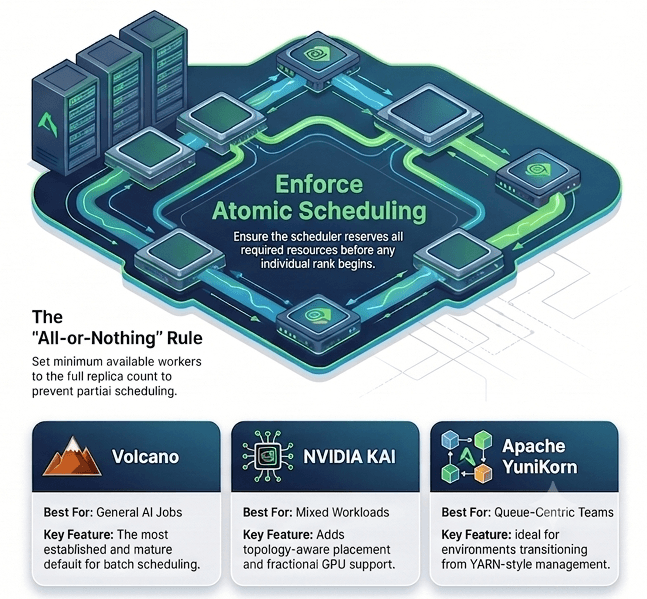
Scheduler capabilities matter most when teams want to prevent gang scheduling failures. First, the scheduler must reserve every required GPU before any rank starts. If it cannot do that, the job should stay queued. This all-or-nothing rule works across platforms. Traditional HPC schedulers such as Slurm and PBS Pro support this pattern.
In contrast, most default Kubernetes schedulers place pods independently and need added support.
Other capabilities also improve large GPU cluster operations. For example, topology-aware placement, GPU locality, queue management, fair share, and preemption reduce fragmentation.
Together, these features help teams improve throughput and manage AI training workloads more predictably.
Therefore, teams should match scheduler capabilities to their AI workflow priorities. Few schedulers support every capability, so the best choice depends on workload, platform, and operating model.
If your training infrastructure runs on Kubernetes, purpose-built batch schedulers close that gap:
| Scheduler | Best For | Key Feature |
|---|---|---|
| Volcano | General AI jobs | The most established and mature default for batch scheduling |
| NVIDIA KAI Scheduler | Mixed workloads | Adds topology-aware placement and fractional GPU support |
| Apache YuniKorn | Queue-centric teams | Ideal for environments transitioning from YARN-style management |
Across HPC and Kubernetes schedulers, the key rule is the same: set the minimum available workers to the full replica count. Anything lower can still allow partial scheduling, regardless of platform.
Three Practical Takeaways
Does gang scheduling only apply to Kubernetes?
No. Gang scheduling applies beyond Kubernetes. HPC schedulers such as Slurm and PBS Pro have supported this all-or-nothing pattern for years. Meanwhile, Kubernetes-based tools such as Volcano, NVIDIA KAI Scheduler, and Apache YuniKorn bring the same rule to containerized AI training clusters.
How do gang scheduling failures affect GPU cluster costs?
Gang scheduling failures increase GPU cluster costs when partial allocations hold devices without useful work. For example, a 32-GPU job missing 4 ranks can leave 28 GPUs idle. As a result, utilization drops and annual compute costs can rise by millions of dollars.
How can you tell if gang scheduling is failing in your cluster?
You can spot gang scheduling failures by watching three signals. First, jobs get stuck in “initializing.” Next, queue wait times no longer match the visible cluster load. Finally, GPU utilization stays low despite active jobs. Together, these signs point to partial allocation rather than a true capacity shortage.
Next Steps
If distributed AI jobs stall, queue times look wrong, or GPU utilization stays low, start with gang scheduling. First, review gang semantics, queue policy, placement rules, and minimum worker settings. Then, fix the scheduling layer before you buy more GPUs.
HighFens helps teams find where gang scheduling failures waste GPU capacity. Schedule a cluster scheduling review at sales@highfens.com to review your AI infrastructure.